NavRadio+
NavimodsAuto & Vehicles
4.353.00 Reviews
- Version
- 0.3.79
- Installs
- 10.00K
- Age Rating
- Everyone
Screenshots
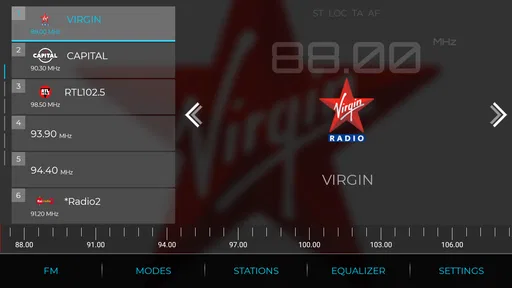
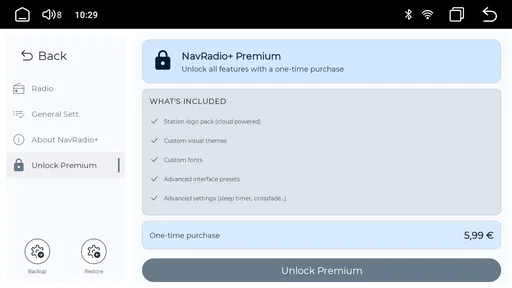
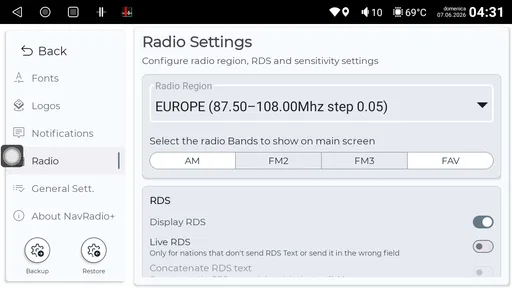
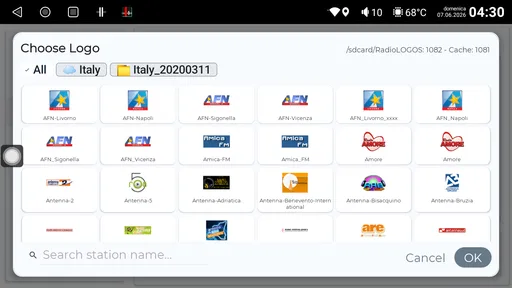
Our Review of NavRadio+
 Analysis by Appyee
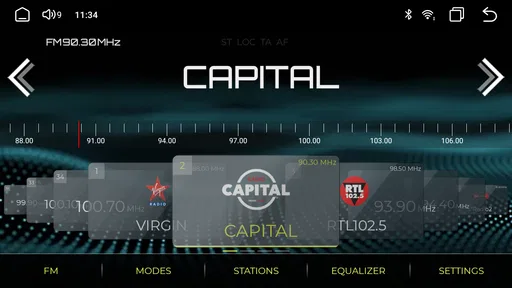
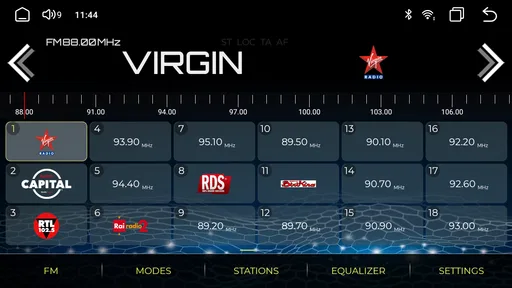
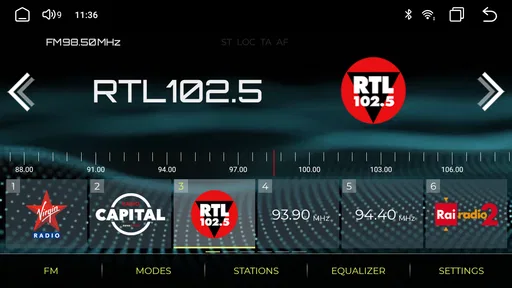
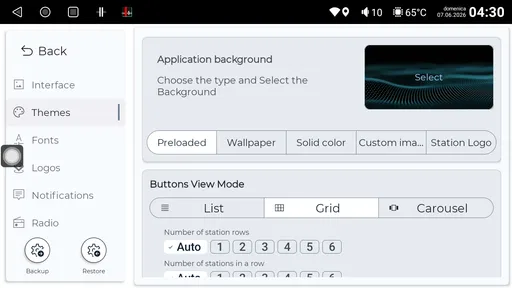
If you are choosing a radio app for a car head unit, the first question I would ask is whether you want to listen to local AM/FM broadcasts or mainly play audio from a phone. Those are different jobs, even if the controls look similar. NavRadio+ is aimed at drivers who want radio stations on a compatible in-car setup, with station logos as part of the presentation. I would not treat it as a general replacement for every music or navigation app; its appeal depends on how much you value broadcast radio in the car.
Start with the head unit, not the feature list
Before buying, I would check that the Android device in the car is the kind of head unit the app is intended to work with. A regular phone connected to a car stereo is not automatically the same thing as an Android car head unit, and the distinction matters here. If you mostly use a handset with Bluetooth, Android Auto, or CarPlay, your existing radio controls and music apps may already cover your needs. The practical decision is whether you want a dedicated radio experience on the head unit itself, rather than another way to stream audio through the phone.
That makes compatibility the first real hurdle, not learning the interface. I would also consider how you use the radio: do you switch between a small group of familiar stations, or browse around while parked before a drive? A station-logo view can make familiar choices easier to recognize, but it cannot make an unsuitable head unit suitable. If you are unsure, checking the device’s radio hardware and the app’s compatibility before paying is a much better use of time than expecting a generic radio app to control any vehicle stereo.
Where a dedicated radio app earns its place
The strongest case for NavRadio+ is a driver who already has a compatible Android head unit and wants local AM/FM listening to feel organized rather than buried among unrelated apps. For a regular commute, a clear visual identity for stations can reduce the small annoyance of remembering which preset is which. It is also useful when you want broadcast radio without making your phone the center of the listening setup. The app comes from Navimods, and its focused purpose is more relevant to this decision than broad claims about being an all-in-one entertainment system.
There is a useful distinction between this and internet radio or music streaming. Broadcast listening can be a simple choice when you want familiar local programming and do not want to browse a music library. Streaming apps are a better fit when you want on-demand albums, playlists, or online stations; a basic radio function built into a head unit may be enough if you only need a few presets and do not care about visual customization. NavRadio+ sits between those options for people who want a more tailored radio interface on their in-car Android device.
What the purchase and setup mean in practice
NavRadio+ is a paid app at $5.99, so I would make the compatibility check before treating it as a casual experiment. It has a 4.3 average from around 850 ratings and has passed 10,000 installs, which gives a prospective buyer some context, though those figures cannot predict how it will behave with a particular head unit. It is rated for Everyone, and the current version is 0.3.79. The release date was January 10, 2020, and it requires Android 7.1 or later.
One sensible setup habit is to arrange the stations you actually use while parked, then leave the interface alone once driving. That turns the logos and station choices into a quick recognition aid rather than an invitation to browse on the move. I would also keep a fallback in mind: if a station is hard to receive on a particular stretch, changing to audio already available through the car or phone may be more practical than repeatedly retuning. The app can improve how you interact with radio, but it cannot change reception conditions or turn broadcasts into an on-demand catalogue.
When another option is the better one
If your car has a conventional radio that already does what you need, paying for a separate app may add little. If your listening is mostly podcasts, saved music, or streaming services, those dedicated apps are likely to be more direct choices. And if you are shopping for an app to add navigation, traffic guidance, voice commands, or phone-projection support, do not assume those jobs are part of a radio-focused product. I would choose NavRadio+ for its particular head-unit use, not because the name suggests it can replace a complete in-car system.
For someone who changes vehicles or head units often, there is another trade-off: a specialized radio tool may not transfer as smoothly to every setup as a familiar phone app. Think about whether the current head unit is where you want this experience to live, and whether the device will remain part of your driving routine. That small bit of planning helps avoid buying an app whose core purpose is a poor match for the way you use your car.
Ever found yourself on a road trip, trying to navigate unfamiliar roads while juggling between your music app and GPS? Well, say hello to NavRadio+, the app that might just be your new best friend on those long drives. I've taken it for a spin, and here's the lowdown.
Seamless Integration: Everything in One Place
One of the first things I noticed about NavRadio+ is its seamless integration with your car's infotainment system. Imagine having your radio, music playlists, and maps all in one place—no more switching between apps! The interface is sleek and user-friendly, making it super easy to navigate, even for someone who isn’t tech-savvy. The app smoothly syncs with both Android Auto and Apple CarPlay, ensuring you stay connected, regardless of your device.
Personalized Listening Experience
Let’s talk about the sound quality. It’s top-notch. But what really stands out is the personalized experience NavRadio+ offers. You can create and customize playlists on the fly, set your favorite stations, and even get recommendations based on your listening habits. It’s like having a personal DJ who knows exactly what you want to hear. The app also supports a wide range of formats, so whether you're a fan of classic rock or the latest pop hits, it has you covered.
Navigation and Safety Features
Now, onto navigation. The GPS feature is integrated directly into the app, offering real-time traffic updates and rerouting options. What’s cool is the voice command feature. You can simply tell it where you want to go, and it does the rest. This hands-free operation is a game-changer for road safety, allowing you to keep your eyes on the road and hands on the wheel. Plus, the app’s ability to sync with your car’s dashboard display means you won’t have to fiddle with your phone while driving.
Design and Usability
The design of NavRadio+ is minimalist yet functional. The app avoids unnecessary clutter, which I appreciate. Everything you need is a tap away, and the learning curve is pretty much non-existent. Whether you're a tech guru or a casual user, you'll find it easy to navigate. The color scheme is easy on the eyes, which is a plus for those long night drives.
Connectivity and Battery Life
One concern with apps that run continuously on your phone is battery drain. Fortunately, NavRadio+ is optimized to use minimal battery, so you can enjoy your journey without worrying about your phone dying halfway through. The app also manages data efficiently, which is great if you’re trying to conserve your data plan while streaming music or using GPS. Connectivity is robust, with minimal dropouts, even in areas with spotty network coverage.
Final Thoughts
All in all, NavRadio+ is a solid app for anyone who spends a lot of time on the road. Its ability to combine radio, music, and navigation into one seamless experience makes it a standout choice. The app is intuitive, reliable, and enhances both the enjoyment and safety of driving. So next time you hit the road, you might want to give NavRadio+ a shot. It just might become your go-to travel companion.
Verdict
Strengths of NavRadio+
- User-friendly interface for easy navigation.
- Customizable settings to suit personal preferences.
- Supports a wide range of radio stations.
- Offline mode available for saved stations.
- Low data usage for streaming.
Limitations of NavRadio+
- Limited features in the free version.
- Occasional ads interrupting the experience.
- Some stations may have buffering issues.
- Interface lacks modern design elements.
- Requires stable internet for optimal performance.
Similar Picks in This Category
View All
Android Auto
Google LLC4.1

maxim — order a taxi & food
PT. SITO4.7

Штрафы ГИБДД: проверка с фото
Pays LLC – Штрафы ГИБДД4.7

Номерограм – проверка авто
Авто Ассист4.8

Дром Авто
Дром4.9

Frequently Asked Questions
What is NavRadio+ and what does it offer?
NavRadio+ is an advanced radio application designed for Android users, providing a wide variety of global radio stations. It offers features such as customizable station presets, user-friendly interface, and high-quality streaming. Ideal for users who enjoy diverse music genres, news, and talk shows from around the world, it enhances the listening experience on mobile devices.
Is NavRadio+ free to use, and are there any in-app purchases?
NavRadio+ is free to download and use, offering access to a vast selection of radio stations without any cost. However, it includes optional in-app purchases that can unlock premium features, such as ad-free streaming and enhanced audio quality. These purchases are entirely optional and designed to enhance the user experience.
How does NavRadio+ ensure good streaming quality?
NavRadio+ utilizes advanced streaming technology to provide high-quality audio regardless of your internet connection. It automatically adjusts the streaming bitrate to ensure smooth playback, minimizing buffering. For an optimal experience, a stable Wi-Fi or mobile data connection is recommended, especially when accessing high-definition stations.
Can I use NavRadio+ offline, and does it support downloads?
NavRadio+ primarily requires an internet connection to stream radio stations, as it does not support offline playback or downloading of live broadcasts. However, users can save their favorite stations for quick access, even though an active connection is necessary to listen to them when offline.
Is NavRadio+ compatible with all Android devices and versions?
NavRadio+ is designed to be compatible with a wide range of Android devices, supporting most recent versions of the Android operating system. It is regularly updated to ensure compatibility with new devices and OS updates. Users with older devices should check the app's requirements on the Google Play Store to ensure compatibility.
